Five Principles for Generating Readable AI Text in Bulk
The Problem
Thanks to modern AI, we humans find ourselves reading AI-generated text at an unprecedented scale! Many of our daily driver products show feeds of such text, e.g., in Claude Code or Codex, there is a sidebar with AI-generated titles of our past agent sessions; on an iPhone, Apple Intelligence now groups and summarizes “stacks” of notifications. People also generate many temporary dashboards and web pages with AI, and share them broadly.
Unfortunately, such feeds of AI-generated texts are quite difficult for humans to read. This isn’t very surprising, as it’s well-known that text items need to be predictable and consistent for humans to read many of them quickly.
In this blog post, informed by our recent experience working with AI to generate text dashboards (and consume lots of AI-generated text in dashboards), we present a checklist of 5 principles for effective feeds of AI-generated text.
Checklist
1. Match How Human Readers Parse Sentences
Interestingly, humans parse text quite predictably and simply, and we have known this for quite some time. In 1970, Thomas Bever, a psycholinguist who studies how people understand sentences, found that English readers use the “NVN” strategy: they take the first noun as the subject, the next verb as its action, and the next noun as its object.1 For example, in “The agent fixed the login bug,” readers take “agent” as the subject, “fixed” as the action, and “bug” as the object.
As a consequence, if text does not follow the NVN pattern, humans need to do multiple passes over the text, which is quite annoying.2 For example, in “Login bug fixed by the agent,” readers first take “bug” as the subject and “fixed” as its action, as if the bug fixed something. Only at “by the agent” do readers find the real subject, and then they parse the text again.
To render a list of text items with as little cognitive effort for readers as possible, here is a rough procedure to follow:
- Start each item with its subject or its verb. If the subject is the same in all items, drop it and start with the verb.
- Put the first verb of each item in the tense that best matches the reader’s expectations: past, continuous, or future.
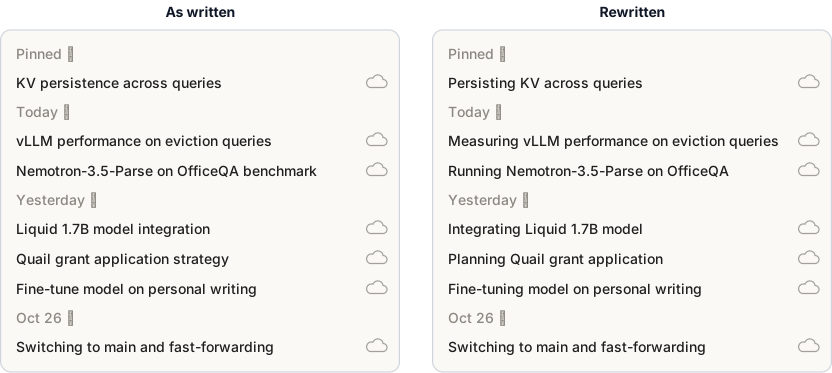
Example. Many of us use a coding agent app every day, e.g., Claude or Codex. The sidebar of the app shows a list of agent sessions. Figure 1 (left) shows a real example from the Claude sidebar. The titles mix nouns (“KV persistence”), gerunds (“Switching to main”), and imperatives (“Fine-tune model on personal writing”). On the right are the same titles, rewritten with the procedure above.
All sessions have the same subject, the agent, so by the procedure above, each title should start with a verb. Then, because each session is active, each verb is in the continuous form, e.g., “Measuring vLLM performance.”
2. Put the Most Important Words First
Jakob Nielsen, a very famous usability researcher who studies how people read websites, used eye tracking to find that readers scan web pages in an “F” shape: they read the start of each line and skip most of the rest3 — and, readers of a list often see only the first two words of each item.4 As such, we should:
- Find the words that make each item different from the other items.
- Move those words as close to the start of the item as possible.
Example. As shown in Figure 2, a bad way to write order email subjects is to put the status last, e.g., “Your order #1001 has shipped.” Then every subject starts with the same words. But Amazon puts the status first, e.g., Ordered: "Bounty Essentials...".

3. Use the Same Structure and the Same Vocabulary
In another interesting psycholinguistic study from the 1980s, Lyn Frazier and her colleagues measured how fast people read sentences with two clauses joined by “and.” Readers read the second clause faster when it had the same structure as the first clause, e.g., when both clauses were active or both were passive.5 One can directly apply this idea to a list of texts: each item is faster to read when it has the same structure as the items before it.6
Moreover, it is well-known that a piece of text should not use two different words for the same concept.7 So, in a list of texts:
- Use one structure in every item.
- Use one word for each concept.
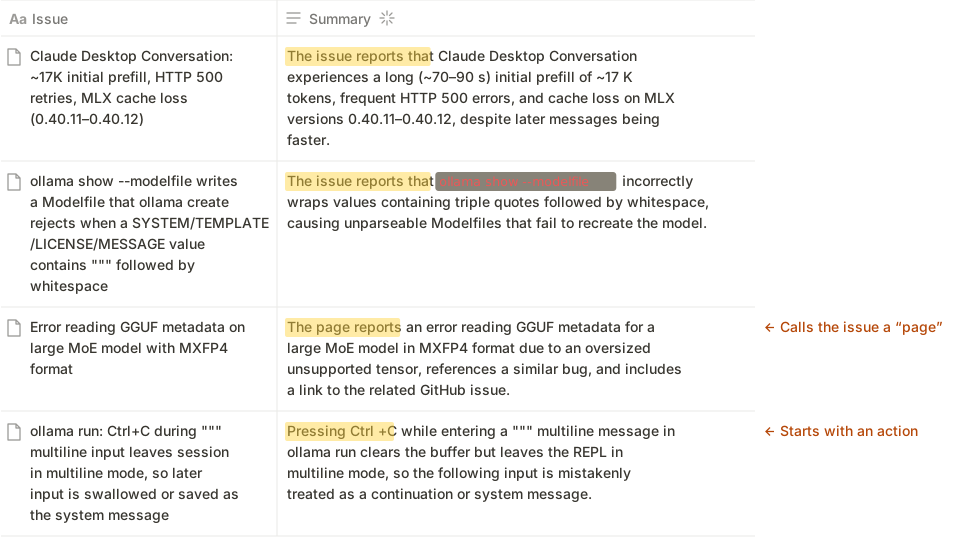
Example. We present one example that does not follow this principle, followed by one that does. For our bad example, we show the AI autofill feature in Notion — which writes one summary for each row of a table in Notion. We made a table of 10 public GitHub issues from Ollama and let Notion AI fill in a Summary column.8 As shown in Figure 3, the summaries are actually hard to quickly skim. The summaries inconsistently start with “The issue reports that,” “The page reports,” or an action (“Pressing Ctrl+C”), and they call the same thing an “issue” in some rows and a “page” in another.
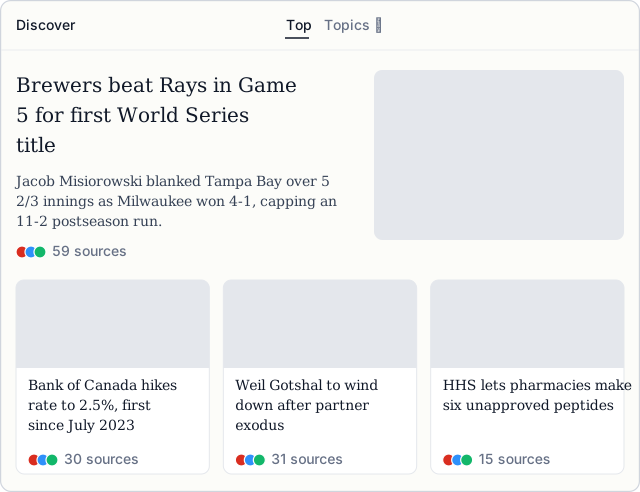
In contrast, Perplexity’s Discover feed nicely follows this checklist item #3 (as well as item #1).9 As shown in Figure 4, every headline has the same structure: the subject, a verb in the present tense, and then the object, e.g., “Bank of Canada hikes rate to 2.5%” and “Brewers beat Rays in Game 5 for first World Series title.”
4. Use Variation Only to Show a Meaningful Difference
In 1986, Jock Mackinlay, a visualization researcher (and pioneer of modern data visualization), wrote a paper on how to design charts automatically.10 One of its main ideas is expressiveness: a chart should express all of the facts in the data, and only the facts in the data. E.g., if one bar in a bar chart is red, readers will assume that the color means something — so make sure any variation in bars represents some meaningful variable.11 Now, although this research is about charts of structured (i.e., tabular) data, it is not so far-fetched to apply it to unstructured text: if one item in a list differs from the others, e.g., in its length, its structure, or its words, readers will assume that the difference means something.
Example. LLMs are often used to summarize the “key themes” in user feedback. We ran Claude’s data analysis plugin on 100 recent Duolingo App Store reviews, to see what a frontier model would do.12 On the left of Figure 5, each card adds a different kind of detail. Only the bugs card names an app version (7.146.0), and only the energy card says that some reviews are in Russian and Turkish. So readers cannot tell whether these details are significant: is 7.146.0 the only version with bugs, and do the other themes come only from English reviews?
On the right, we rewrote every card so that each one has the same components: a sentence about what users say, followed by one example from the reviews. We also show the number of reviews, an important variable, for each theme in a bar chart. Of course, the rewritten cards drop some detail, but readers can still open the reviews of any theme they care about.
5. Align the Connotation of Verbs with the Purpose of the Dashboard
Many dashboards exist to surface one kind of information, e.g., what customers dislike, or what customers like and what is going well. The verbs in a dashboard should make its purpose obvious. For example, a dashboard of customer complaints should use clearly negative verbs, like “complain,” and a dashboard of praise should use clearly positive verbs, like “love.” Readers skim dashboards with very little attention, so a verb with a strong connotation helps readers grasp each item quickly.13
Example. In Figure 5, Claude’s version starts the chess card with “Chess is a popular new draw,” even though most of the card lists complaints. So readers cannot tell at a glance whether the theme is good or bad news. In our version, each card starts with a verb that has an obvious sentiment, e.g., “Users love” for praise and “Users complain” for problems, so readers can tell from the verb alone whether a theme is praise or a complaint.
Takeaways
In this post, we discussed five principles for making lots of AI-generated text easy to read. While we only discussed simple dashboard-like examples, we believe these principles apply to any artifact or product that AI generates, e.g., websites. So please, feed this checklist into your coding agents, or make a skill out of it, so your AI-generated texts are easy for humans to read. Page by page, let’s move towards a world free of slop.
Notes
1. Thomas G. Bever. The Cognitive Basis for Linguistic Structures. In J. R. Hayes, editor, Cognition and the Development of Language, pages 279–362. Wiley, New York, 1970. Bever describes the strategy as reading a noun, a verb, and a noun as the actor, the action, and the object of the action.
2. Lyn Frazier and Keith Rayner. Making and Correcting Errors During Sentence Comprehension: Eye Movements in the Analysis of Structurally Ambiguous Sentences. Cognitive Psychology, 14(2):178–210, 1982. In an eye-tracking study, readers of sentences with a misleading start moved their eyes back to earlier words to parse the sentence again.
3. Jakob Nielsen. F-Shaped Pattern for Reading Web Content (Original Study). Nielsen Norman Group, April 16, 2006. The study tracked the eyes of 232 users as they read thousands of web pages.
4. Jakob Nielsen. First 2 Words: A Signal for the Scanning Eye. Nielsen Norman Group, April 6, 2009.
5. Lyn Frazier, Lori Taft, Tom Roeper, Charles Clifton, and Kate Ehrlich. Parallel Structure: A Source of Facilitation in Sentence Comprehension. Memory & Cognition, 12(5):421–430, 1984. In 2010, Sturt, Keller, and Dubey found that readers also read a phrase faster when it has the same structure as an earlier phrase, even when “and” does not join the two phrases: Patrick Sturt, Frank Keller, and Amit Dubey. Syntactic Priming in Comprehension: Parallelism Effects with and without Coordination. Journal of Memory and Language, 62(4):333–351, 2010.
6. Funnily enough, modern data compression algorithms work in a similar way, by exploiting repeated patterns. E.g., gzip stores a pattern the first time it appears and replaces each later copy with a short pointer back to it. So a list with one pattern is easy to compress, both for gzip and for a reader.
7. E.g., a core rule of ASD Simplified Technical English, a writing standard for aircraft maintenance manuals, is “one word, one meaning.” Also, Jakob Nielsen’s fourth usability heuristic says that users “should not have to wonder whether different words, situations, or actions mean the same thing.” See Jakob Nielsen. 10 Usability Heuristics for User Interface Design. Nielsen Norman Group, 1994.
8. We copied 10 open issues from ollama/ollama on October 28, 2026, and added a Notion AI autofill property named “Summary” with its default settings. Figure 4 shows the summaries of issues #19359, #19342, #19375, and #19340, without changes.
9. Perplexity Discover, accessed October 28, 2026.
10. Jock Mackinlay. Automating the Design of Graphical Presentations of Relational Information. ACM Transactions on Graphics, 5(2):110–141, 1986.
11. Jeff Heer. CSE 512: Data Visualization. University of Washington, Spring 2024. See the lectures on data and image models and on visualization design.
12. We downloaded the 100 most recent US App Store reviews of Duolingo from Apple’s public review feed on October 28, 2026; they are from October 26 and 27, 2026. Claude ran the data:analyze skill of Claude’s data analysis plugin on them and wrote 11 theme cards. Figure 5 shows five of them, without changes. The word counts in the text are ours; the plugin did not report them.
13. It turns out, after asking Claude, that there is related prior work, which we have not read closely. E.g., Kousta, Vinson, and Vigliocco found that people recognize emotion words, positive or negative, faster than neutral words. See Stavroula-Thaleia Kousta, David P. Vinson, and Gabriella Vigliocco. Emotion Words, Regardless of Polarity, Have a Processing Advantage over Neutral Words. Cognition, 112(3):473–481, 2009.